Fine-tune a classifier
This guide adapts the default pretrained ResNet-18 to a folder of custom
classes. ResNet18_Checkpoint.DEFAULT.value was trained on
Imagenette, a ten-class subset of
ImageNet. Many bundled classification checkpoints target Imagenette; selected
ReXNet checkpoints target ImageNet-1K instead. Always inspect the selected
checkpoint metadata.
Prepare the dataset
ImageFolder expects one directory per
class, with matching class directories under train and val:
dataset/
├── train/
│   ├── class_a/
│   │   ├── image_001.jpg
│   │   └── image_002.jpg
│   └── class_b/
│       └── image_003.jpg
└── val/
    ├── class_a/
    │   └── image_004.jpg
    └── class_b/
        └── image_005.jpg
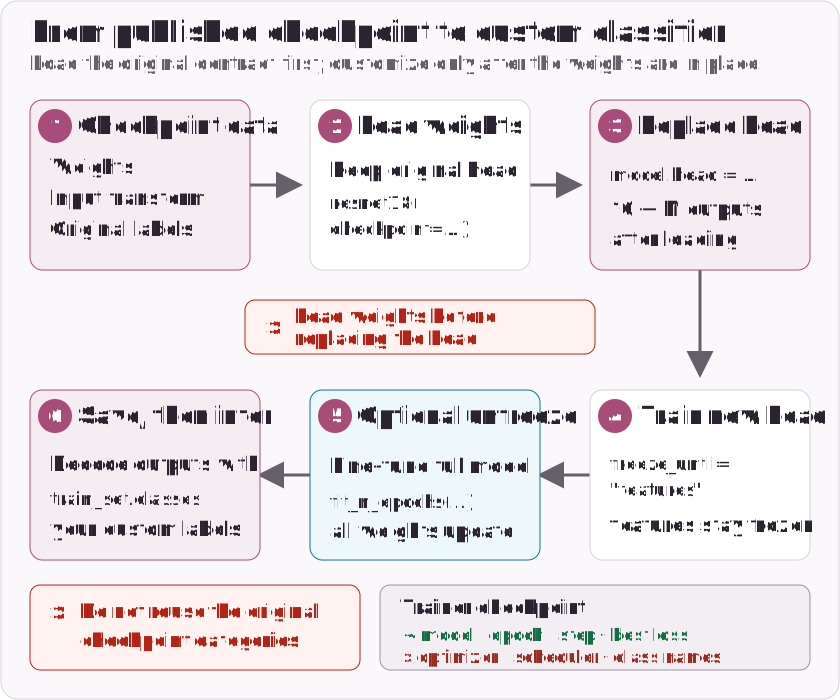
Load the checkpoint metadata first. It defines the input size, interpolation, normalization and original labels used by the published weights:
import torch
from torch import nn
from torch.utils.data import DataLoader
from torchvision.datasets import ImageFolder

from holocron.models.classification import ResNet18_Checkpoint, resnet18
from holocron.trainer import ClassificationTrainer

checkpoint = ResNet18_Checkpoint.DEFAULT.value
original_labels = checkpoint.meta.categories
train_transform = checkpoint.transforms(train=True)
val_transform = checkpoint.transforms()

train_set = ImageFolder("dataset/train", transform=train_transform)
val_set = ImageFolder("dataset/val", transform=val_transform)
if train_set.classes != val_set.classes:
    raise ValueError("train and val must contain the same class directories")

train_loader = DataLoader(train_set, batch_size=32, shuffle=True, num_workers=4)
val_loader = DataLoader(val_set, batch_size=32, num_workers=4)
original_labels describes the checkpoint's Imagenette outputs before the
head is replaced. train_set.classes describes your custom outputs.
Load the weights, then replace the head
The checkpoint must load while the model still has its original ten-output
head. Replace model.head only afterwards:
model = resnet18(checkpoint=checkpoint)
model.head = nn.Linear(model.head.in_features, len(train_set.classes))
Replacing the head before loading the checkpoint would create a state-dict shape mismatch.
Train the custom head
Start by freezing features, which leaves the new head trainable:
criterion = nn.CrossEntropyLoss()
optimizer = torch.optim.AdamW(model.parameters(), lr=3e-4)
trainer = ClassificationTrainer(
    model,
    train_loader,
    val_loader,
    criterion,
    optimizer,
    device="auto",  # CUDA, MPS, then CPU
    output_file="resnet18-custom.pth",
)
trainer.fit_n_epochs(5, lr=3e-4, freeze_until="features")
Optionally unfreeze the full model and continue at a lower learning rate:
Calling fit_n_epochs without freeze_until makes every model parameter
trainable again.
Save and resume
The trainer automatically saves its best validation state to output_file.
You can also save and load explicitly:
trainer.save("resnet18-custom.pth")
state = torch.load("resnet18-custom.pth", map_location="cpu", weights_only=True)
trainer.load(state)
Current trainer checkpoints contain the model, epoch, step and best loss. They
do not contain optimizer or scheduler state, so loading resumes model and
counter state rather than the exact optimization trajectory. Persist
train_set.classes with your deployment artifacts because trainer checkpoints
do not store class names.
Run inference with custom labels
After fine-tuning, use ImageFolder.classes, not
checkpoint.meta.categories, to decode the new head:
from PIL import Image

image = Image.open("image.jpg").convert("RGB")
device = next(model.parameters()).device

model.eval()
with torch.inference_mode():
    probabilities = model(val_transform(image).unsqueeze(0).to(device)).squeeze(0).softmax(dim=0)

class_idx = probabilities.argmax().item()
label = train_set.classes[class_idx]
confidence = probabilities[class_idx].item()
print(label, confidence)
Target constraints
For the CrossEntropyLoss setup above, hard targets are torch.int64 class
indices in [0, number_of_classes). A configured ignore_index may appear
outside that range and excludes those hard targets from the loss. Soft targets
are also supported as floating-point class probabilities with the same shape
as the logits; ignore_index applies only to hard class-index targets.